全键盘配置教程
注意: 此功能不做兼容性保证!如果你发现你的配置不生效了,有可能是因为app主做相关的改动,请回来看文档,再做修改!!!
版本要求:此功能需要 Xime v2.5.0 及以上版本(
button_layout需要 v2.5.0-beta10 及以上版本),旧版本不支持自定义配置文件。
Xime 支持通过 xime.custom.yaml 配置文件自定义全键盘的按键布局、手势、配色和样式。以下详细介绍各配置字段的含义。
配置文件位于设备
rime/目录下,需命名为xime.custom.yaml,修改后需 重新部署 生效。注意:请勿直接编辑
xime.yaml,应用升级时会被覆盖。自定义配置应始终写在xime.custom.yaml中,系统会自动合并覆盖默认配置。
应用你的配置文件
- 打开
xime app -> 输入方案 -> 浏览器导入。 - 打开你的浏览器,输入手机显示的地址,需要注意的是,手机和电脑浏览器要在同一个网络下。
- 把
xime.custom.yaml上传。 - 回到 xime app,点击部署。
- 完成
配置文件结构总览
metadata:             # 版本信息(自动生成,无需手动修改)
  app_name: Xime
  app_version: ">=2.5.0"
  platform: android
  config_version: 1
  generator: "Xime Config Generator"
  modified_time: "2026-06-18"

xime_index:           # 方案/插件/模型市场索引
  base_urls: [...]   # 下载源地址列表

style:                # 全局样式
  color_scheme: lavender_purple

color_schemes:        # 配色方案定义
  lavender_purple:    # 配色名称(与 style.color_scheme 对应)
    name: "薰衣草紫"
    primary_color: 0x8F73E2

keyboard:             # 键盘配置
  colors:             # 键盘颜色(可选)
    keyboard_bg_color: 0xE3E4E8
    # ...
  key:                # 按键样式(可选,v2.5.0+)
    corner_radius: 8
  shadow:             # 按键阴影(可选)
    enabled: true
    elevation: 1
  qwerty:             # 中文键盘按键
    keys:
      q: { tap: "q", swipe_up: "1", swipe_down: {...}, long_press: {...} }
      # ...
  qwerty_en:          # 英文键盘按键
    keys:
      q: { tap: "q", swipe_up: "1", long_press: {...} }
      # ...
metadata — 配置元数据
配置文件的基础信息,用于版本兼容性校验和来源追踪。
metadata:
  app_name: Xime
  app_version: ">=2.4.2"
  platform: android
  config_version: 1
  generator: "Xime"
  modified_time: "2026-06-18"
字段说明
| 字段 | 类型 | 说明 |
|---|---|---|
app_name | 字符串 | 应用名称,固定为 Xime |
app_version | 字符串 | 版本约束(语义化版本范围),如 ">=2.4.2"。配置文件加载时校验当前 APP 版本是否满足约束,不满足时仅警告不影响加载 |
platform | 字符串 | 目标平台,可选 android / windows / linux。用于跨平台配置管理 |
config_version | 整数 | 配置文件格式版本,递增表示配置结构有破坏性变更。当前为 1 |
generator | 字符串 | 生成配置的工具名称,如 "Xime"、"Xime Settings Browser Import" |
modified_time | 字符串 | 最后修改时间 |
xime_index — 市场索引
xime_index:
  base_urls:
    - "https://cdn.jsdelivr.net/gh/ximeiorg/xime-index@master/"
    - "https://fastly.jsdelivr.net/gh/ximeiorg/xime-index@master/"
    - "https://index.ximei.me/"
    - "https://raw.githubusercontent.com/ximeiorg/xime-index/refs/heads/main/"
配置方案/插件/模型市场的下载端点。下载器会按顺序依次尝试,直到成功为止。可替换为自建代理或镜像地址。
地址末尾需要
/。
style — 全局样式
style:
  font_size: 14            # 候选词字体大小(单位:sp,手机端无效)
  candidate_count: 5       # 候选栏显示的候选词数量(手机端无效)
  show_code_hint: true     # 是否在候选词右上角显示编码提示(手机端无效)
  horizontal: true         # 候选栏是否水平排列(手机端无效)
  color_scheme: lavender_purple  # 使用的配色方案名称(对应 color_schemes 中的键名)
font_size、candidate_count、show_code_hint、horizontal仅在 PC 端生效,手机端无效。
字段说明
| 字段 | 类型 | 默认值 | 说明 |
|---|---|---|---|
font_size | 整数 | 14 | 候选栏文字的字号,单位 sp(仅 PC) |
candidate_count | 整数 | 5 | 候选栏同时显示的候选词数量(仅 PC) |
show_code_hint | 布尔 | true | true 时在候选词右上角显示对应的五笔编码(仅 PC) |
horizontal | 布尔 | true | true 为横向滚动候选栏,false 为纵向排列(仅 PC) |
color_scheme | 字符串 | "lavender_purple" | 引用 color_schemes 中定义的配色键名 |
color_schemes — 配色方案
color_schemes:
  lavender_purple:
    name: "薰衣草紫"
    primary_color: 0x8F73E2

  ocean_blue:
    name: "海洋蔚蓝"
    primary_color: 0x1A73E8

  forest_green:
    name: "森林翠绿"
    primary_color: 0x2E7D32

  sunset_orange:
    name: "落日橙光"
    primary_color: 0xE65100

  coral_red:
    name: "珊瑚绯红"
    primary_color: 0xC62828

  slate_gray:
    name: "沉稳石墨"
    primary_color: 0x424242

  rose_pink:
    name: "浪漫玫瑰"
    primary_color: 0xAD1457

  teal_cyan:
    name: "青碧如水"
    primary_color: 0x00796B
以上为内置配色方案,你也可以自定义添加。
字段说明
| 字段 | 类型 | 说明 |
|---|---|---|
键名 | 字符串 | 配色唯一标识,如 lavender_purple,被 style.color_scheme 引用 |
name | 字符串 | 配色显示名称,在设置界面中展示 |
primary_color | 十六进制 | 主题色,格式 0xAARRGGBB(Alpha + RGB)。如 0x8F73E2 为薰衣草紫 |
keyboard_background | 对象 | 可选,键盘背景配置(纯色/渐变/图片),不填则使用全局默认 |
key_bg_color / key_bg_color_dark | 十六进制 | 可选,按键背景色及其暗色变体 |
key_text_color / key_text_color_dark | 十六进制 | 可选,按键文字颜色及其暗色变体 |
candidate_text_color / candidate_text_color_dark | 十六进制 | 可选,候选文字颜色及其暗色变体 |
candidate_selected_text_color / candidate_selected_text_color_dark | 十六进制 | 可选,候选选中文字颜色及其暗色变体(v2.6.0-beta3+)。未设置时回退到 key_text_color |
primary_color中的 AA 为 Alpha 通道(透明度),可省略(省略时默认为完全不透明)。 各颜色覆盖字段不填时,将回退到keyboard.colors中的全局默认值。
keyboard_background — 键盘背景(v2.6 新增)
以下功能在 v2.6.0 以上版本才可用。
keyboard_background 支持三种背景类型(type),默认均为纯色。如需渐变/图片背景,在对应主题下覆盖 keyboard_background 即可。
纯色(solid):
keyboard_background:
  type: solid
  color: 0xE3E4E8        # 亮色
  color_dark: 0x1E1838   # 暗色(可选,不填则自动暗化)
渐变(gradient):
keyboard_background:
  type: gradient
  colors: [0x8F73E2, 0xE8DEF8]        # 亮色渐变断点(至少 2 个)
  colors_dark: [0x4A3F7A, 0x2D2040]   # 暗色渐变断点(可选)
  angle: 90                            # 角度制,0=左→右,90=下→上
图片(image):
keyboard_background:
  type: image
  src: "themes/bg.png"          # 相对于 rime/ 用户目录(优先)或 assets/(回退)
  src_dark: "themes/bg_night.png" # 暗色变体(可选)
  fit: cover                     # cover | contain | fill | fit_width | fit_height | none
  overlay_alpha: 0.35            # 背景遮罩强度(0~1),半透明黑色覆盖层压暗背景
  overlay_alpha_dark: 0.5        # 暗色模式下的遮罩强度(可选,不填则沿用 overlay_alpha)
fit 值 | 说明 |
|---|---|
cover | 缩放并裁剪以铺满背景(默认) |
contain | 完整显示图片,可能有留白 |
fill | 拉伸铺满,可能变形 |
fit_width | 宽度铺满,高度自适应 |
fit_height | 高度铺满,宽度自适应 |
none | 原始大小 |
自定义图片背景有两种方式:
- 分享导入:在系统相册/文件管理中把图片「分享到 Xime」,图片自动存入
rime/themes/custom_<时间戳>.jpg,并把可用的color_schemes配置模板复制到剪贴板,粘贴到rime/xime.custom.yaml后即可在主题设置中选择。 - 手动放置:把图片放入
rime/themes/(如通过 USB 或文件管理器),然后在xime.custom.yaml中添加引用它的color_scheme,src写相对rime/的路径。内置主题的同名文件会被用户目录中的文件覆盖。
keyboard — 键盘配置
keyboard 包含以下子部分:
| 子项 | 说明 |
|---|---|
colors | 键盘颜色配置(可选) |
key | 按键样式配置(可选,v2.5.0+) |
shadow | 按键阴影配置(可选) |
fonts | 自定义字体配置(可选,v2.8.0+) |
qwerty | 中文键盘(26 键)按键定义 |
qwerty_en | 英文键盘(26 键)按键定义 |
qwerty_14 / qwerty_17 / qwerty_18 | 合并键布局(拼音 14/17/18 键方案专用,v2.8.4+) |
t9 | 九键(T9)键盘配置(v2.8.0+) |
stroke | 笔画键盘配置 |
handwriting | 手写键盘配置 |
keyboard.<section>.schemas — 键盘布局绑定声明(v2.8.6+)
版本要求:此功能需要 Xime v2.8.6 及以上版本。
用于声明「哪些输入方案使用该 keyboard section 的键盘布局」。切换方案时,应用按声明加载对应 section 的布局;未声明绑定的方案一律使用全键盘(26 键)。
keyboard:
  qwerty_14:
    schemas: [pinyin_14jian]

  t9:
schemas: [t9_pinyin, t9, wanxiang_t9]内置绑定声明如下(xime.yaml):
| 键盘 section | 内置声明的方案 |
|---|---|
qwerty_14 | pinyin_14jian |
qwerty_17 | pinyin_17jian |
qwerty_18 | pinyin_18jian |
t9 | t9_pinyin、t9、wanxiang_t9 |
stroke | stroke |
handwriting | handwriting |
说明:
- 声明是唯一来源:应用不再按方案 id(如
14jian、t9)中的关键字猜测布局,未声明的方案一律全键盘; - 在
xime.custom.yaml中写schemas为追加语义:在内置声明基础上补充,不会移除内置声明; - 同一个方案 id 在多个 section 中声明时,以最后出现的为准;
- 接入第三方方案:九键 / 笔画 / 手写方案,在
xime.custom.yaml对应 section 的schemas中追加方案 id 即可;自定义合并键布局则新增 section(layout.rows+keys+schemas)即可生效,无需等待应用发版。
从旧版本升级:此前版本按方案 id / 名称中的关键字自动识别九键(
t9)和合并键(14jian等)布局。升级到 v2.8.6+ 后,未在xime.yaml/xime.custom.yaml中声明schemas的第三方方案将回退为全键盘,需要在xime.custom.yaml中补充声明。
keyboard.qwerty.button_layout — 按键布局模式(v2.5.0-beta10+)
版本要求:此功能需要 Xime v2.5.0-beta10 及以上版本。
用于切换中文键盘按键的内部布局方式,适合不同的显示需求。
keyboard:
  qwerty:
button_layout: compact # 中文键盘使用紧凑布局| 值 | 说明 |
|---|---|
standard | 默认布局:主文字居中,下滑提示在按键底部显示(默认值) |
compact | 紧凑布局:主文字在左上角,上滑提示在右上角,下滑提示占满按键右侧剩余空间,支持多行显示 |
示例效果:
| 五笔字根(standard 布局 + display: bubble) | 小鹤双拼韵母(compact 布局 + display: key) |
|---|---|
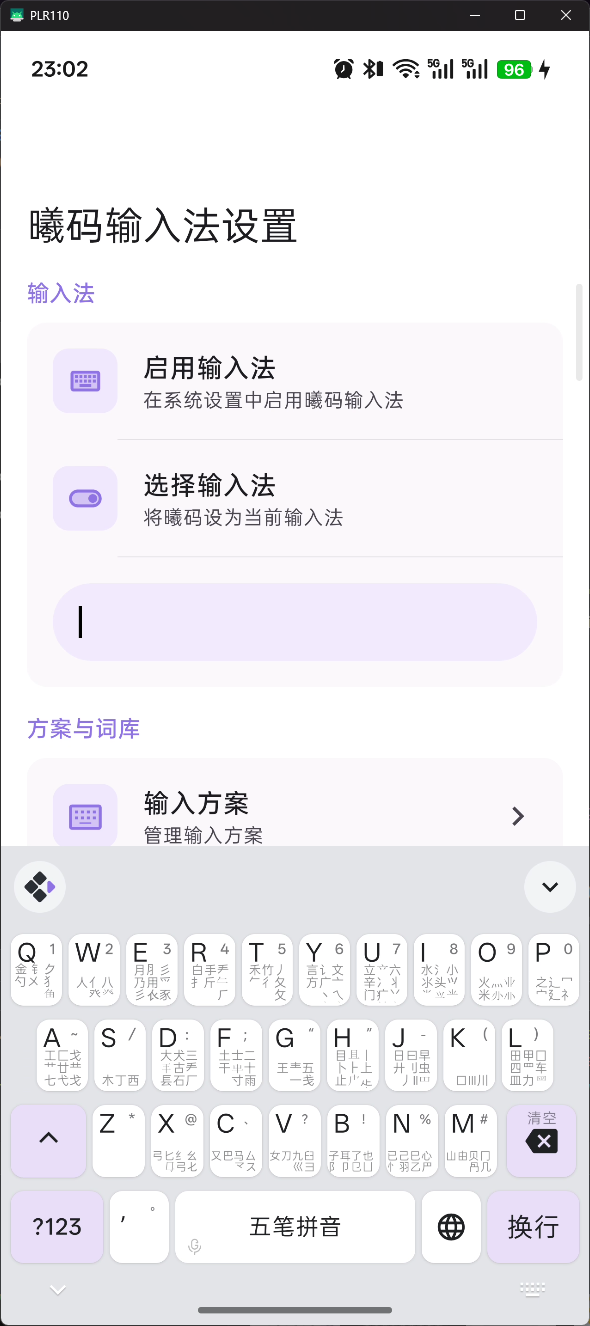 | 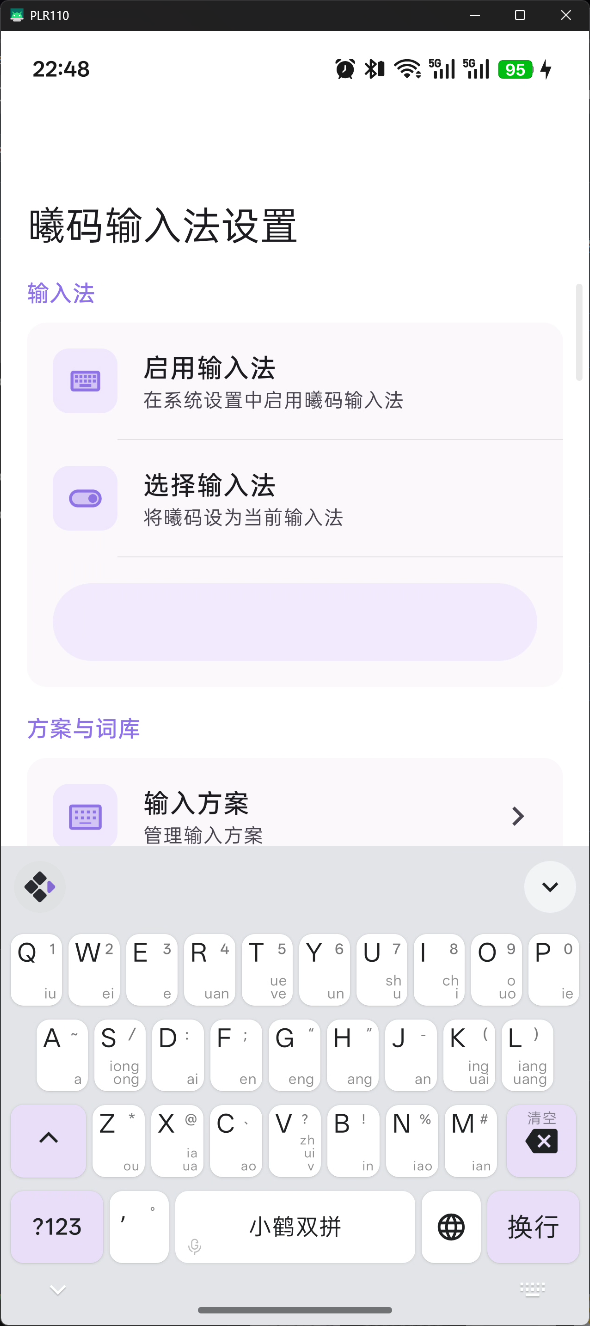 |
qwerty_en 也支持同样的配置:
keyboard:
  qwerty_en:
    button_layout: compact    # 英文键盘也使用紧凑布局
keyboard.qwerty.layout.rows — 键盘行布局自定义(v2.5.2+)
版本要求:此功能需要 Xime v2.5.2 及以上版本。
用于自定义键盘每行显示的按键。默认 26 键键盘为 3 行布局(10 + 9 + 7),你可以通过 layout.rows 重新排列。
keyboard:
  qwerty:
    layout:
      rows:
        - [q, w, e, r, t, y, u, i, o, p]
        - [a, s, d, f, g, h, j, k, l, ";"]
        - [z, x, c, v, b, n, m]
字段说明
| 字段 | 类型 | 说明 |
|---|---|---|
rows | 数组 | 二维数组,每行为一个按键名称数组,按键名称为 keys 中定义的键名 |
注意:
layout.rows只控制按键的排列位置和顺序,按键的具体行为(手势)仍需在keys中定义。目前第四行(空格、功能键等)暂不受layout控制。横屏分体键盘同样使用
layout.rows:每行按键前/后各取一半(按键数为奇数时中间键在左右两侧各出现一次),自定义布局在横屏下同样生效。
qwerty_en 也支持同样的配置:
keyboard:
  qwerty_en:
    layout:
      rows:
        - [q, w, e, r, t, y, u, i, o, p]
        - [a, s, d, f, g, h, j, k, l, ";"]
        - [z, x, c, v, b, n, m]
keyboard.colors — 键盘颜色
可选,不设置则使用内置默认值。
keyboard:
  colors:
    keyboard_bg_color: 0xE3E4E8           # 键盘背景色(亮色)
    keyboard_bg_color_dark: 0x202020      # 键盘背景色(暗色)
    key_bg_color: 0xFFFFFF                # 按键背景色(亮色)
    key_bg_color_dark: 0x4A4A4A           # 按键背景色(暗色)
    special_key_bg_color: 0x8F73E2        # 特殊按键背景色(亮色,不设置时默认取主题色)
    special_key_bg_color_dark: 0x4A4A4A   # 特殊按键背景色(暗色,不设置时默认取主题色)
    candidate_bar_bg_color: 0xE3E4E8      # 候选栏背景色(亮色)
    candidate_bar_bg_color_dark: 0x202020 # 候选栏背景色(暗色)
    key_text_color: 0x202124              # 按键文字颜色(亮色)
    key_text_color_dark: 0xE8EAED         # 按键文字颜色(暗色)
    candidate_text_color: 0x202124        # 候选文字颜色(亮色)
    candidate_text_color_dark: 0xE8EAED   # 候选文字颜色(暗色)
字段说明
| 字段 | 类型 | 说明 |
|---|---|---|
keyboard_bg_color | 十六进制 | 键盘背景色(亮色主题) |
keyboard_bg_color_dark | 十六进制 | 键盘背景色(暗色主题) |
key_bg_color | 十六进制 | 普通按键背景色(亮色主题) |
key_bg_color_dark | 十六进制 | 普通按键背景色(暗色主题) |
special_key_bg_color | 十六进制 | 特殊按键(如 Shift)背景色(亮色主题,不设置时默认取主题色) |
special_key_bg_color_dark | 十六进制 | 特殊按键背景色(暗色主题,不设置时默认取主题色) |
candidate_bar_bg_color | 十六进制 | 候选栏背景色(亮色主题) |
candidate_bar_bg_color_dark | 十六进制 | 候选栏背景色(暗色主题) |
key_text_color | 十六进制 | 按键文字颜色(亮色主题) |
key_text_color_dark | 十六进制 | 按键文字颜色(暗色主题) |
candidate_text_color | 十六进制 | 候选文字颜色(亮色主题) |
candidate_text_color_dark | 十六进制 | 候选文字颜色(暗色主题) |
keyboard.key — 按键样式配置(v2.5.0+)
版本要求:此功能需要 Xime v2.5.0 及以上版本。
用于配置按键的圆角半径等外观属性。
keyboard:
  key:
    corner_radius: 8    # 按键圆角半径(dp,默认 8)
字段说明
| 字段 | 类型 | 默认值 | 说明 |
|---|---|---|---|
corner_radius | 整数 | 8 | 按键圆角半径,单位 dp |
keyboard.shadow — 按键阴影
可选,不设置则使用默认值。
keyboard:
  shadow:
    enabled: true        # 是否启用阴影
    elevation: 1         # 阴影高度(dp,默认 1)
字段说明
| 字段 | 类型 | 默认值 | 说明 |
|---|---|---|---|
enabled | 布尔 | true | 是否启用按键阴影 |
elevation | 整数 | 1 | 阴影高度,单位 dp |
keyboard.fonts — 自定义字体(v2.8.0+)
版本要求:此功能需要 Xime v2.8.0 及以上版本。
用于自定义键盘按键、字根、候选项和注释的字体。字体文件需放在设备 rime/ 目录(或其子目录)下,可通过浏览器导入上传。
导入字体文件:打开 xime app -> 输入方案 -> 浏览器导入,在浏览器中上传 .ttf / .otf / .woff / .woff2 字体文件,会自动保存到 rime/fonts/ 目录。
keyboard:
  fonts:
    key_font: "fonts/MyFont.ttf"            # 按键主字字体
    key_label_font: "fonts/MyRootFont.ttf"  # 字根/标签字体
    candidate_font: "fonts/MyCandFont.ttf"  # 候选项字体
    comment_font: "fonts/MyCommentFont.ttf" # 候选注释字体
字段说明
| 字段 | 类型 | 默认值 | 说明 |
|---|---|---|---|
key_font | 字符串 | 空 | 按键主字字体,为空时使用系统默认字体 |
key_label_font | 字符串 | 空 | 字根/标签字体(按键下滑提示、气泡、长按气泡),为空时默认使用内置 ChaiPUA 字体(支持 CJK 扩展区字符) |
candidate_font | 字符串 | 空 | 候选项字体,为空时使用系统默认字体 |
comment_font | 字符串 | 空 | 候选注释(comment/拆分)字体,为空时使用系统默认字体 |
字体路径查找规则
字体配置支持三种路径写法,均以应用数据根目录为基准:
| 写法 | 示例 | 实际查找位置 |
|---|---|---|
绝对路径(以 / 开头) | /fonts/MyFont.ttf | 应用数据根目录下的 fonts/ |
rime/ 开头 | rime/fonts/MyFont.ttf | 应用数据根目录下的 rime/fonts/ |
相对路径(含 /) | fonts/MyFont.ttf | rime/fonts/(浏览器导入的默认位置) |
| 仅文件名 | MyFont.ttf | rime/ 目录(配置文件同目录) |
使用场景
- 键盘显示字根:形码方案(五笔/仓颉等)在按键上或气泡中显示字根时,可通过
key_label_font指定包含这些字形的字体 - 候选注释显示拆分:候选词的编码注释/拆分提示可通过
comment_font指定专用字体
字体文件不存在或加载失败时,自动回退到默认字体,不影响输入法使用。
keyboard.t9 — 九键键盘配置(v2.8.0+)
版本要求:此功能需要 Xime v2.8.0 及以上版本。
schemas — 方案绑定(v2.8.6+)
声明使用九键布局的输入方案,内置默认为 [t9_pinyin, t9, wanxiang_t9];第三方九键方案在 xime.custom.yaml 中追加方案 id 即可,未声明的方案一律全键盘。绑定规则详见上文「keyboard.<section>.schemas — 键盘布局绑定声明」。
side_symbols — 左侧快捷符号栏
自定义九键键盘左侧空闲时显示的快捷符号列表。列表长度不限:不超过 4 个时等分铺满左栏,超过 4 个时可上下滑动。打字状态下该区域显示拼音候选,不受此配置影响。
keyboard:
  t9:
    side_symbols:
      - ","
      - "。"
      - "?"
      - "!"
      - "、"
      - ":"
      - ";"
- "…"- 未配置时使用内置默认值(
,。?!) - 在
xime.custom.yaml中写同路径的side_symbols即可覆盖整个列表 - 每项为单个符号或字符串,点击即上屏
keyboard.qwerty_14 / qwerty_17 / qwerty_18 — 合并键布局(v2.8.4+)
版本要求:此功能需要 Xime v2.8.4 及以上版本。
为拼音 14 键 / 17 键 / 18 键方案提供的专用键盘布局。内置方案通过 schemas 声明绑定(v2.8.6+,见上文「键盘布局绑定声明」),选用对应方案时自动启用对应布局;英文键盘不受影响(切换英文后仍是标准 26 键)。
合并语法
layout.rows 的行元素支持嵌套子数组,子数组内的字母合并在同一个键,每行键数变少、按键自然更宽(行内等宽):
layout:
  rows:
    - [[q, w], [e, r], [t, y], [u, i], [o, p]]
    - ...
合并键在 keys 中的 id 为组内字母拼接(如 qw、er):
tap:label显示组内字母,value固定为组内第一个字母(代表字母),Rime 侧由方案的拼写运算靠词库消歧swipe_up:前 10 个键按行序输出数字 1-0,其余键沿用 26 键同字母的符号习惯long_press:气泡保留组内字母的精确输入作为辅助
内置默认布局
| section | 对应方案 | 分组 |
|---|---|---|
qwerty_14 | pinyin_14jian | qw/er/ty/ui/op、as/df/gh/jk/l、zx/cv/bn/m |
qwerty_17 | pinyin_17jian | we/rt/yu/op、sd/fg/jk、xc/bn |
qwerty_18 | pinyin_18jian | we/rt/io、sd/fg/jk、xc/bn |
上表「对应方案」即各 section 内置的
schemas声明。为其他方案启用合并键布局时,在xime.custom.yaml中声明schemas即可(v2.8.6+),无需等待应用发版。
三个方案的 Rime schema 示例见仓库
docs/schemas_examples/目录(pinyin_14jian.schema.yaml/pinyin_17jian.schema.yaml/pinyin_18jian.schema.yaml),可作为自制定制方案的参考或直接导入使用。
自定义覆盖
在 xime.custom.yaml 中写同名 section 即可覆盖内置默认:
layout.rows为整段覆盖:写了rows就需要给出完整的三行布局,而不是只写要改的一行keys为按键级覆盖:只需写要修改的键,未写的键沿用内置默认;注意覆盖是整键替换,该键的tap/swipe_up/long_press等手势需要在同一条里完整给出schemas为追加声明(v2.8.6+):为自定义方案接入合并键布局时,在其中声明方案 id(如schemas: [my_schema])
keyboard:
  qwerty_18:
    keys:
      # 示例:把 jk 键的上滑符号由 "-" 改为 "/"(整键替换,手势需写全)
      jk: { tap: { label: "jk", value: "j" }, swipe_up: "/", long_press: { display: "bubble", values: ["j", "k", "J", "K"] } }
keyboard.keys — 键盘按键配置
这是全键盘配置的核心部分,每个按键可以定义 4 种手势操作。qwerty 对应中文 26 键键盘,qwerty_en 对应英文 26 键键盘。
手势类型
| 手势 | 字段 | 说明 |
|---|---|---|
| 点按 | tap | 单击按键 |
| 上滑 | swipe_up | 从按键向上滑动 |
| 下滑 | swipe_down | 从按键向下滑动 |
| 长按 | long_press | 长按按键,弹出气泡后左右滑动选择 |
手势值格式
每个手势的值有三种格式:
1. 字符串简写
直接填写字符串,点击后上屏该文本,按键上显示的也是它。
q: { tap: "q" }2. 对象格式(label + action + value)
q: { tap: { label: "Q", action: "commit", value: "q" } }| 字段 | 类型 | 必填 | 说明 |
|---|---|---|---|
label | 字符串 | 是 | 按键上显示的文字 |
action | 字符串 | 是 | 动作类型(见下方动作列表) |
value | 字符串 | 否 | 上屏时的输出文本,不指定则用 label |
display | 字符串 | 否 | 显示模式,仅 swipe_down 和 long_press 支持 |
3. 对象格式(label + value,仅用于 swipe_up)
上滑符号可使用独立于 label 的 value,用于在按键上显示中文符号但上屏英文符号:
a: { tap: "a", swipe_up: { label: "~", value: "~" } }| 字段 | 类型 | 必填 | 说明 |
|---|---|---|---|
label | 字符串 | 是 | 按键上显示的文字 |
value | 字符串 | 是 | 上屏时的输出文本 |
4. 动作类型(action)
| 动作 | 说明 |
|---|---|
commit | 上屏文字(value 指定上屏内容,不指定则用 label) |
toggle_ascii | 中/英输入模式切换 |
command | 执行内置命令(value 指定命令名) |
clipboard | 打开剪贴板面板,供选择粘贴 |
select_all | 全选当前输入框中的文本 |
copy | 复制选中的文本 |
cut | 剪切选中的文本 |
paste | 粘贴剪贴板内容 |
line_start | 光标移动到行首 |
line_end | 光标移动到行尾 |
undo | 撤销上一步操作 |
none | 无动作,仅用于显示(如显示五笔字根) |
repeat | 重复上一次输入 |
5. 内置命令(command)
当 action 为 command 时,value 支持以下命令:
| 命令 | 说明 |
|---|---|
clear_composition | 清空当前输入编码和候选词 |
show_ime_picker | 显示系统输入法选择器(切换输入法) |
6. 显示模式(display)
仅 swipe_down 和 long_press 支持:
| 模式 | 值 | 说明 |
|---|---|---|
| 气泡显示 | "bubble" | 下滑或长按时以气泡弹出显示内容,不占用按键空间 |
| 按键显示 | "key" | 直接在按键上显示文字(配合 compact 布局时显示在按键右下方,支持多行) |
长按配置(long_press)
长按支持弹出多个选项供用户滑动选择。使用 display: "bubble" 配合 values 数组:
# 对象格式 — 可指定 label、action、value
long_press:
  display: "bubble"
  values:
    - { label: "大写", action: "commit", value: "A" }
    - { label: "Ä",   action: "commit", value: "ä" }

# 字符串简写 — 直接上屏
long_press:
  display: "bubble"
  values: ["q", "Q"]
下滑配置(swipe_down)
下滑通常用于显示五笔字根(action: none 仅显示不上屏),或快捷操作(如粘贴、全选等)。
字根显示(气泡模式)
swipe_down:
label: "金 钅𠂊勺㐅 犭𱼀" # 字根文字
action: "none" # 仅显示,不上屏
display: "bubble" # 气泡显示快捷操作(按键模式)
swipe_down:
  label: "粘贴"      # 按键上显示的文字
  action: "paste"    # 粘贴动作
  display: "key"     # 直接显示在按键上
逗号键
逗号键使用单引号 ' 作为键名:
"'": { tap: { label: ",", value: "," }, swipe_up: { label: "。", value: "." } }label 为按键上显示的中文符号,value 为上屏时的实际符号。
中/英切换键
使用键名 earth,通过 toggle_ascii 动作切换中英文输入模式:
# 中文键盘:按键显示"英",点击切换到英文模式
earth: { tap: { label: "英", action: "toggle_ascii" } }

# 英文键盘:按键显示"中",点击切换到中文模式
earth: { tap: { label: "中", action: "toggle_ascii" } }
动态语言标签
使用 @language 作为 label 时,按键会自动显示当前语言的名称(中文键盘显示"英",英文键盘显示"中"),无需手动指定:
# 自动显示当前语言的切换按钮
earth: { tap: { label: "@language", action: "toggle_ascii" } }
参考示例
应用源码的 docs/config_examples/ 目录按场景提供了多个示例配置,每个子目录内各有一份可直接使用的 xime.custom.yaml:
| 示例目录 | 说明 | 重点演示 |
|---|---|---|
full/ | 完整全键盘配置,适合作为自定义起点 | style 全局样式、9 套内置配色、keyboard.colors / key / shadow 样式,中英文键盘全部手势(上滑、下滑、长按) |
wubi_compact/ | 五笔字根 + compact 布局 | button_layout: compact,下滑显示五笔字根(action: none 仅显示不上屏) |
flypy/ | 小鹤双拼方案 | 下滑提示韵母,附带 keyboard.colors、key、shadow 样式配置 |
cangjie/ | 仓颉输入法按键配置 | tap 显示仓颉字根(label 显示字根、value 上屏字母)、上滑数字、长按带变音符号的相似字母 |
msdouble/ | 微软双拼方案(v2.5.0+) | layout.rows 自定义键盘行布局、button_layout: compact |
shortcut/ | 快捷操作按键(最小示例) | 全选 / 剪切 / 复制 / 粘贴 / 段首段尾等编辑动作绑定下滑,仅含 keyboard 段,适合合并进现有配置 |
theme/ | 主题配色自定义 | zine 系列 5 套配色,keyboard_background 纯色 / 渐变 / 图片背景与 dark_mode,仅含 color_schemes 段 |
使用方式:在浏览器中打开对应目录下的 xime.custom.yaml,点击 Raw 按钮下载原始文件后,通过「浏览器导入」上传即可;也可以只复制其中需要的配置段(如 color_schemes、keyboard)合并到自己的 xime.custom.yaml 中。
完整全键盘配置
metadata:
app_name: Xime
app_version: ">=2.4.2"
platform: android
config_version: 1
generator: "Xime"
modified_time: "2026-06-18"
xime_index:
# 方案/插件/模型市场索引端点(ximeiorg/xime-index)。
# 可替换为自建代理/镜像,下载器按顺序依次尝试,直到成功为止。
# 末尾需要 /。
base_urls:
- "https://cdn.jsdelivr.net/gh/ximeiorg/xime-index/"
- "https://fastly.jsdelivr.net/gh/ximeiorg/xime-index/"
- "https://index.ximei.me/"
- "https://raw.githubusercontent.com/ximeiorg/xime-index/refs/heads/main/"
style:
color_scheme: lavender_purple
color_schemes:
lavender_purple:
name: "薰衣草紫"
primary_color: 0x8F73E2
ocean_blue:
name: "海洋蔚蓝"
primary_color: 0x1A73E8
forest_green:
name: "森林翠绿"
primary_color: 0x2E7D32
sunset_orange:
name: "落日橙光"
primary_color: 0xE65100
coral_red:
name: "珊瑚绯红"
primary_color: 0xC62828
slate_gray:
name: "沉稳石墨"
primary_color: 0x424242
rose_pink:
name: "浪漫玫瑰"
primary_color: 0xAD1457
teal_cyan:
name: "青碧如水"
primary_color: 0x00796B
## `keyboard.qwerty` / `keyboard.qwerty_en` — 键盘按键配置
colors:
keyboard_bg_color: 0xE3E4E8
keyboard_bg_color_dark: 0x202020
key_bg_color: 0xFFFFFF
key_bg_color_dark: 0x4A4A4A
candidate_bar_bg_color: 0xE3E4E8
candidate_bar_bg_color_dark: 0x202020
key_text_color: 0x202124
key_text_color_dark: 0xE8EAED
candidate_text_color: 0x202124
candidate_text_color_dark: 0xE8EAED
key:
corner_radius: 8
shadow:
enabled: true
elevation: 1
keys:
# ── 第一行 ──
# long_press 顺序:小写 → 大写 → 带变音符号的相似字母
# swipe_down 显示对应的五笔字根(action:none 仅显示不上屏)
# display: bubble → 气泡显示;key → 显示在按键上(最多显示 2 个字)
q: { tap: "q", swipe_up: "1", swipe_down: { label: "金 钅𠂊勺㐅 犭𱼀", action: "none", display: "bubble" }, long_press: { display: "bubble", values: ["q", "Q"] } }
w: { tap: "w", swipe_up: "2", swipe_down: { label: "人亻八癶", action: "none", display: "bubble" }, long_press: { display: "bubble", values: ["w", "W"] } }
e: { tap: "e", swipe_up: "3", swipe_down: { label: "月⺼彡乃用爫彡𧘇豕", action: "none", display: "bubble" }, long_press: { display: "bubble", values: ["e", "E", "è", "é", "ê", "ë"] } }
r: { tap: "r", swipe_up: "4", swipe_down: { label: "白手龵扌斤𰀪𠂆", action: "none", display: "bubble" }, long_press: { display: "bubble", values: ["r", "R"] } }
t: { tap: "t", swipe_up: "5", swipe_down: { label: "禾竹丿𠂉彳夂攵", action: "none", display: "bubble" }, long_press: { display: "bubble", values: ["t", "T"] } }
y: { tap: "y", swipe_up: "6", swipe_down: { label: "言讠文方广亠丶乀", action: "none", display: "bubble" }, long_press: { display: "bubble", values: ["y", "Y", "ÿ"] } }
u: { tap: "u", swipe_up: "7", swipe_down: { label: "立六辛冫丬门疒丷䒑", action: "none", display: "bubble" }, long_press: { display: "bubble", values: ["u", "U", "ù", "ú", "û", "ü"] } }
i: { tap: "i", swipe_up: "8", swipe_down: { label: "水氵小氺头𭕄⺌", action: "none", display: "bubble" }, long_press: { display: "bubble", values: ["i", "I", "ì", "í", "î", "ï"] } }
o: { tap: "o", swipe_up: "9", swipe_down: { label: "火灬米", action: "none", display: "bubble" }, long_press: { display: "bubble", values: ["o", "O", "ò", "ó", "ô", "õ", "ö", "ø"] } }
p: { tap: "p", swipe_up: "0", swipe_down: { label: "之辶冖宀廴礻", action: "none", display: "bubble" }, long_press: { display: "bubble", values: ["p", "P"] } }
# ── 第二行 ──
a: { tap: "a", swipe_up: "~", swipe_down: { label: "工匚戈艹廿龷七弋戈", action: "none", display: "bubble" }, long_press: { display: "bubble", values: ["a", "A", "à", "á", "â", "ã", "ä", "å", "æ"] } }
s: { tap: "s", swipe_up: "/", swipe_down: { label: "木丁西", action: "none", display: "bubble" }, long_press: { display: "bubble", values: ["s", "S", "ß"] } }
d: { tap: "d", swipe_up: ":", swipe_down: { label: "大犬三古龵镸石厂丆", action: "none", display: "bubble" }, long_press: { display: "bubble", values: ["d", "D"] } }
f: { tap: "f", swipe_up: ";", swipe_down: { label: "土士二干十寸雨", action: "none", display: "bubble" }, long_press: { display: "bubble", values: ["f", "F"] } }
g: { tap: "g", swipe_up: "“", swipe_down: { label: "王龶五一戋", action: "none", display: "bubble" }, long_press: { display: "bubble", values: ["g", "G"] } }
h: { tap: "h", swipe_up: "”", swipe_down: { label: "目丨卜⺊上止龰", action: "none", display: "bubble" }, long_press: { display: "bubble", values: ["h", "H"] } }
j: { tap: "j", swipe_up: "-", swipe_down: { label: "日曰早廾刂虫丿Ⅱ", action: "none", display: "bubble" }, long_press: { display: "bubble", values: ["j", "J"] } }
k: { tap: "k", swipe_up: "(", swipe_down: { label: "口Ⅲ川", action: "none", display: "bubble" }, long_press: { display: "bubble", values: ["k", "K"] } }
l: { tap: "l", swipe_up: ")", swipe_down: { label: "田甲囗四罒车皿力", action: "none", display: "bubble" }, long_press: { display: "bubble", values: ["l", "L"] } }
# ── 第三行 ──
z: { tap: "z", swipe_up: "*", swipe_down: { label: "", action: "none", display: "key" }, long_press: { display: "bubble", values: [ "z","Z"] } }
x: { tap: "x", swipe_up: "@", swipe_down: { label: "弓匕纟幺弓𠤎", action: "none", display: "bubble" }, long_press: { display: "bubble", values: ["x", "X"] } }
c: { tap: "c", swipe_up: "、", swipe_down: { label: "又巴马厶龴ス", action: "none", display: "bubble" }, long_press: { display: "bubble", values: ["c", "C", "ç"] } }
v: { tap: "v", swipe_up: "?", swipe_down: { label: "女刀九臼巛彐", action: "none", display: "bubble" }, long_press: { display: "bubble", values: ["v", "V"] } }
b: { tap: "b", swipe_up: "!", swipe_down: { label: "子耳了也阝卩㔾凵", action: "none", display: "bubble" }, long_press: { display: "bubble", values: ["b", "B"] } }
n: { tap: "n", swipe_up: "%", swipe_down: { label: "已己巳心忄羽乙𠃜", action: "none", display: "bubble" }, long_press: { display: "bubble", values: ["n", "N", "ñ"] } }
m: { tap: "m", swipe_up: "#", swipe_down: { label: "山由贝冂冎几", action: "none", display: "bubble" }, long_press: { display: "bubble", values: ["m", "M"] } }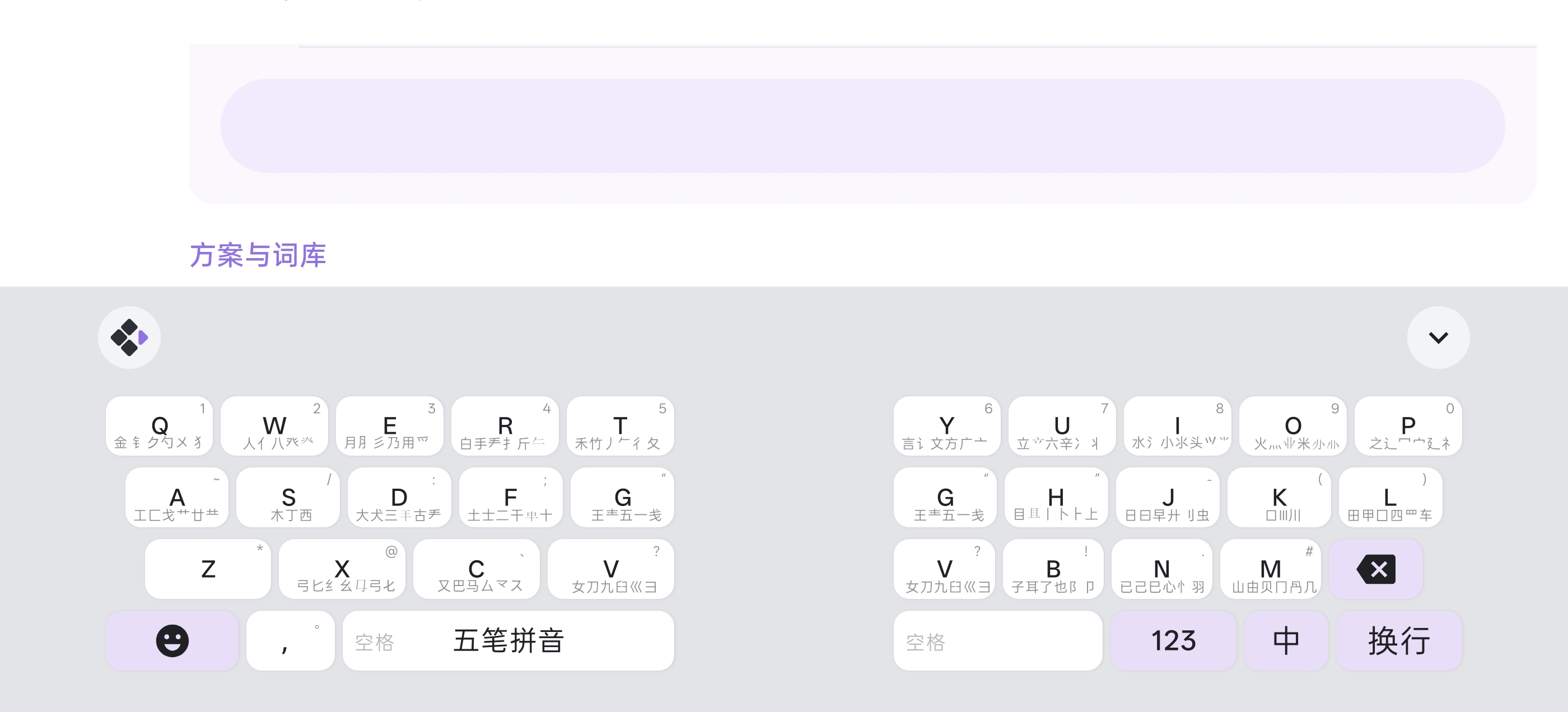
快捷键方案
将中文键盘第三行按键的下滑手势替换为文本编辑快捷键,并为英文键盘也添加对应的快捷键:
style:
  color_scheme: lavender_purple

keyboard:
  colors:
    keyboard_bg_color: 0xE3E4E8
    keyboard_bg_color_dark: 0x202020
    key_bg_color: 0xFFFFFF
    key_bg_color_dark: 0x4A4A4A
    candidate_bar_bg_color: 0xE3E4E8
    candidate_bar_bg_color_dark: 0x202020
    key_text_color: 0x202124
    key_text_color_dark: 0xE8EAED
    candidate_text_color: 0x202124
    candidate_text_color_dark: 0xE8EAED

  key:
    corner_radius: 8

  shadow:
    enabled: true
    elevation: 1

  qwerty:
    keys:
      # ── 第三行(仅列出有修改的按键)──
      z: { tap: "z", swipe_up: "*", swipe_down: { label: "全选", action: "select_all", display: "key" }, long_press: { display: "bubble", values: [ { label: "清空", action: "command", value: "clear_composition" } ] } }
      x: { tap: "x", swipe_up: "@", swipe_down: { label: "剪切", action: "cut", display: "key" }, long_press: { display: "bubble", values: ["x", "X"] } }
      c: { tap: "c", swipe_up: "、", swipe_down: { label: "复制", action: "copy", display: "key" }, long_press: { display: "bubble", values: ["c", "C", "ç"] } }
      v: { tap: "v", swipe_up: "?", swipe_down: { label: "粘贴", action: "paste", display: "key" }, long_press: { display: "bubble", values: ["v", "V"] } }
      b: { tap: "b", swipe_up: "!", swipe_down: { label: "", action: "none", display: "key" }, long_press: { display: "bubble", values: ["b", "B"] } }
      n: { tap: "n", swipe_up: "%", swipe_down: { label: "段首", action: "line_start", display: "key" }, long_press: { display: "bubble", values: ["n", "N", "ñ"] } }
      m: { tap: "m", swipe_up: "#", swipe_down: { label: "段尾", action: "line_end", display: "key" }, long_press: { display: "bubble", values: ["m", "M"] } }

  qwerty_en:
    keys:
      # ── 第三行(仅列出有修改的按键)──
      z: { tap: "z", swipe_up: "*", swipe_down: { label: "全选", action: "select_all", display: "key" }, long_press: { display: "bubble", values: [ { label: "clear", action: "command", value: "clear_composition" } ] } }
      x: { tap: "x", swipe_up: "@", swipe_down: { label: "cut", action: "cut", display: "key" }, long_press: { display: "bubble", values: ["x", "X"] } }
      c: { tap: "c", swipe_up: "、", swipe_down: { label: "copy", action: "copy", display: "key" }, long_press: { display: "bubble", values: ["c", "C"] } }
      v: { tap: "v", swipe_up: "?", swipe_down: { label: "paste", action: "paste", display: "key" }, long_press: { display: "bubble", values: ["v", "V"] } }
      b: { tap: "b", swipe_up: "!", swipe_down: { label: "", action: "none", display: "key" }, long_press: { display: "bubble", values: ["b", "B"] } }
      n: { tap: "n", swipe_up: "%", swipe_down: { label: "line start", action: "line_start", display: "key" }, long_press: { display: "bubble", values: ["n", "N"] } }
      m: { tap: "m", swipe_up: "#", swipe_down: { label: "line end", action: "line_end", display: "key" }, long_press: { display: "bubble", values: ["m", "M"] } }
      # 逗号键
      "'": { tap: { label: ",", value: "," }, swipe_up: { label: ".", value: "." } }
      # 中/英切换键
      earth: { tap: { label: "中", action: "toggle_ascii" } }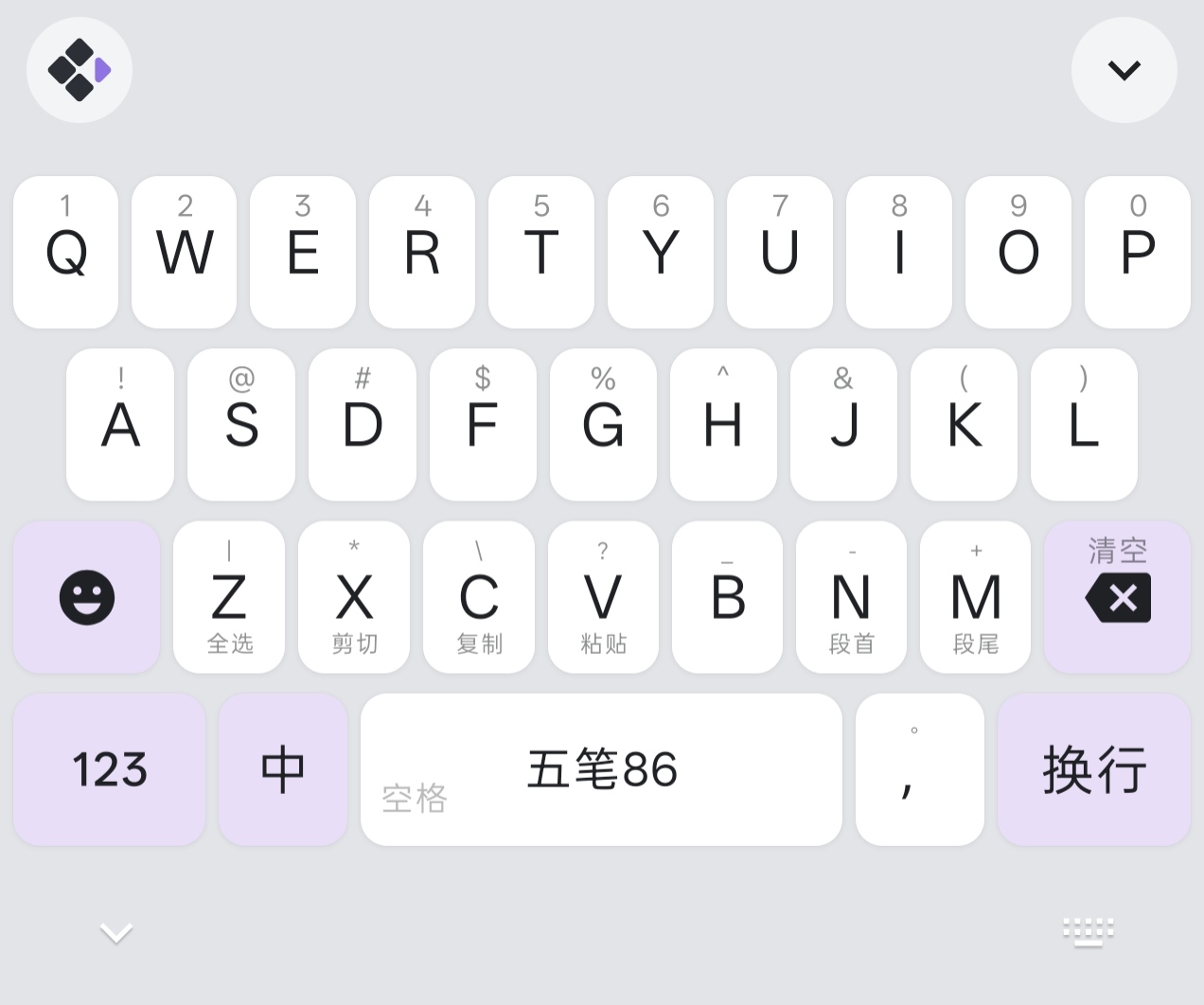
配色主题示例
展示了不同灰度的配色方案(银灰 · 浅、中灰 · 中、烟灰 · 深、墨灰 · 浓),可供参考自定义 color_schemes:
style:
  color_scheme: zine_medium

color_schemes:
  zine_light:
    name: "银灰 · 浅"
    primary_color: 0x9E9E9E

  zine_medium:
    name: "中灰 · 中"
    primary_color: 0x616161

  zine_dark:
    name: "烟灰 · 深"
    primary_color: 0x424242

  zine_deep:
    name: "墨灰 · 浓"
    primary_color: 0x212121

  zine_photo:
    name: "夜幕之影"     # 图片背景示例,配合 overlay_alpha 压暗
    primary_color: 0x8F73E2
    keyboard_background:
      type: image
      src: "themes/bg.jpg"
      fit: cover
      overlay_alpha: 0.15
      overlay_alpha_dark: 0.30
    key_bg_color: 0x8cffffff
    key_bg_color_dark: 0x5affffff
    key_text_color: 0x232323
    key_text_color_dark: 0xf2f2f2
    candidate_text_color: 0x232323
    candidate_text_color_dark: 0xf2f2f2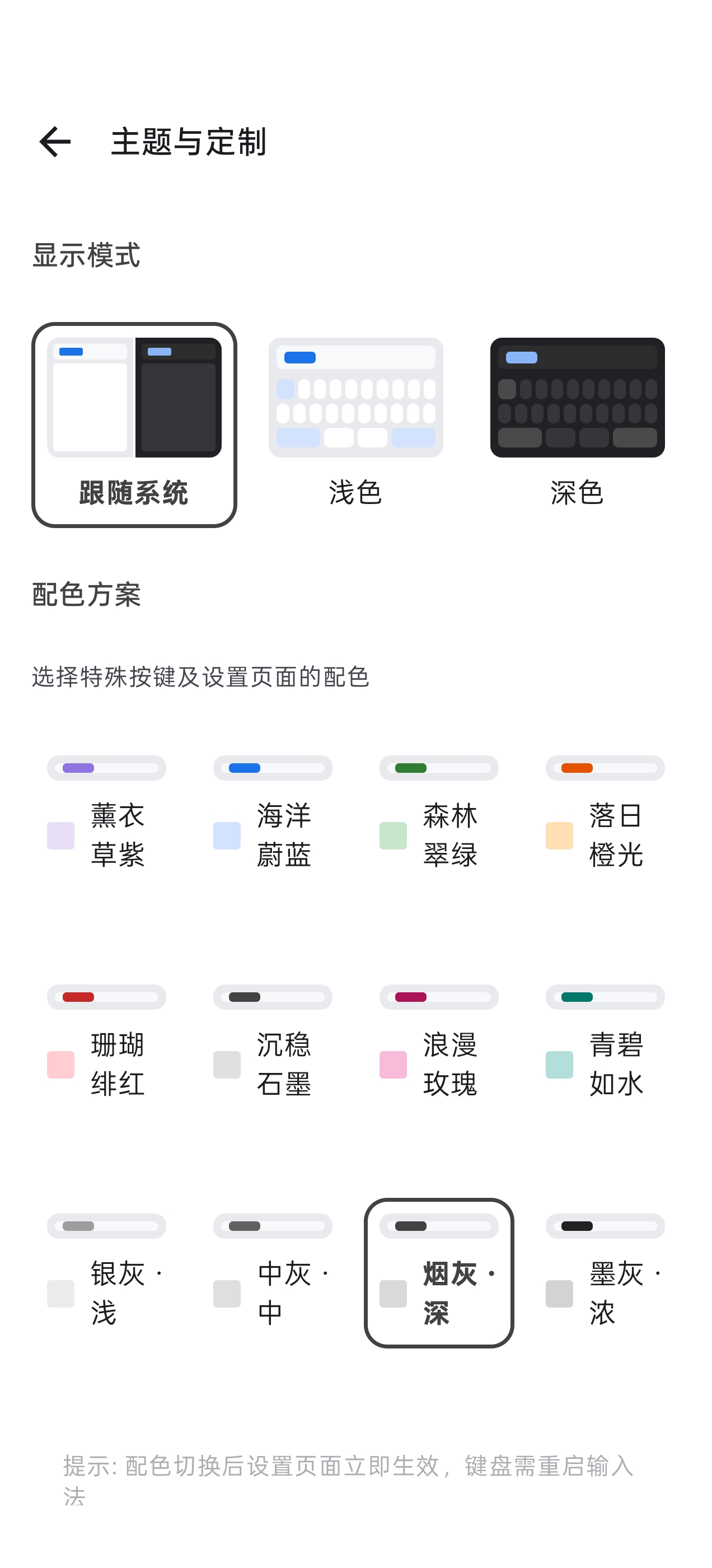
仓颉输入法的显示
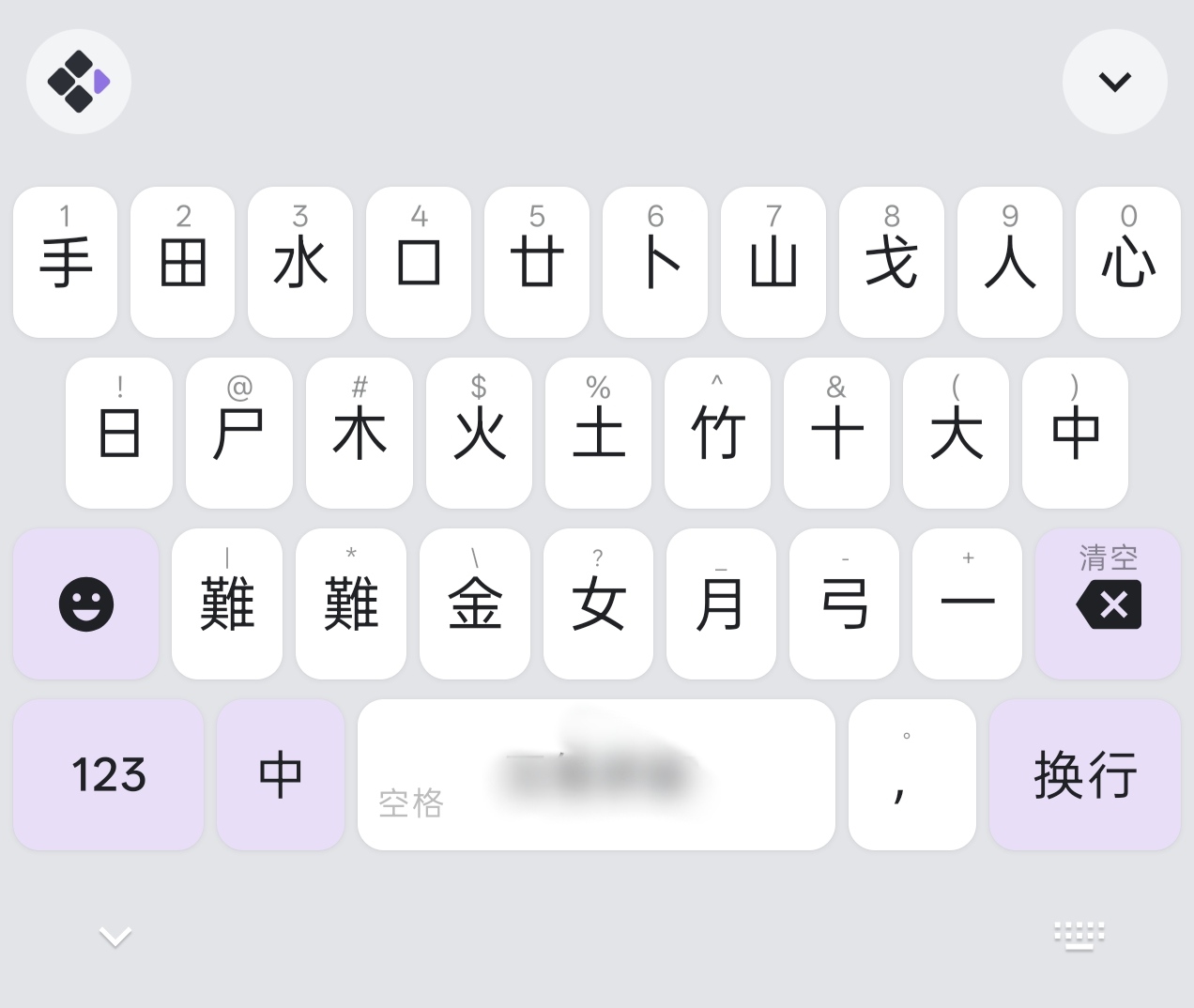
将字母按键的点按显示为对应的仓颉字根:
keyboard:
  qwerty:
    keys:
      # ── 第一行 ──
      # long_press 顺序:小写 → 大写 → 带变音符号的相似字母
      # tap 显示对应的仓颉字根
      q: { tap: { label: "手", action: "commit", value: "q" }, swipe_up: "1", long_press: { display: "bubble", values: ["q", "Q"] } }
      w: { tap: { label: "田", action: "commit", value: "w" }, swipe_up: "2", long_press: { display: "bubble", values: ["w", "W"] } }
      e: { tap: { label: "水", action: "commit", value: "e" }, swipe_up: "3", long_press: { display: "bubble", values: ["e", "E", "è", "é", "ê", "ë"] } }
      r: { tap: { label: "口", action: "commit", value: "r" }, swipe_up: "4", long_press: { display: "bubble", values: ["r", "R"] } }
      t: { tap: { label: "廿", action: "commit", value: "t" }, swipe_up: "5", long_press: { display: "bubble", values: ["t", "T"] } }
      y: { tap: { label: "重", action: "commit", value: "y" }, swipe_up: "6", long_press: { display: "bubble", values: ["y", "Y", "ÿ"] } }
      u: { tap: { label: "山", action: "commit", value: "u" }, swipe_up: "7", long_press: { display: "bubble", values: ["u", "U", "ù", "ú", "û", "ü"] } }
      i: { tap: { label: "戈", action: "commit", value: "i" }, swipe_up: "8", long_press: { display: "bubble", values: ["i", "I", "ì", "í", "î", "ï"] } }
      o: { tap: { label: "人", action: "commit", value: "o" }, swipe_up: "9", long_press: { display: "bubble", values: ["o", "O", "ò", "ó", "ô", "õ", "ö", "ø"] } }
      p: { tap: { label: "心", action: "commit", value: "p" }, swipe_up: "0", long_press: { display: "bubble", values: ["p", "P"] } }

      # ── 第二行 ──
      a: { tap: { label: "日", action: "commit", value: "a" }, swipe_up: "~", long_press: { display: "bubble", values: ["a", "A", "à", "á", "â", "ã", "ä", "å", "æ"] } }
      s: { tap: { label: "尸", action: "commit", value: "s" }, swipe_up: "/", long_press: { display: "bubble", values: ["s", "S", "ß"] } }
      d: { tap: { label: "木", action: "commit", value: "d" }, swipe_up: ":", long_press: { display: "bubble", values: ["d", "D"] } }
      f: { tap: { label: "火", action: "commit", value: "f" }, swipe_up: ";", long_press: { display: "bubble", values: ["f", "F"] } }
      g: { tap: { label: "土", action: "commit", value: "g" }, swipe_up: "“", long_press: { display: "bubble", values: ["g", "G"] } }
      h: { tap: { label: "竹", action: "commit", value: "h" }, swipe_up: "”", long_press: { display: "bubble", values: ["h", "H"] } }
      j: { tap: { label: "十", action: "commit", value: "j" }, swipe_up: "-", long_press: { display: "bubble", values: ["j", "J"] } }
      k: { tap: { label: "大", action: "commit", value: "k" }, swipe_up: "(", long_press: { display: "bubble", values: ["k", "K"] } }
      l: { tap: { label: "中", action: "commit", value: "l" }, swipe_up: ")", long_press: { display: "bubble", values: ["l", "L"] } }

      # ── 第三行 ──
      z: { tap: { label: "*", action: "commit", value: "z" }, swipe_up: "*", long_press: { display: "bubble", values: ["z", "Z"] } }
      x: { tap: { label: "難", action: "commit", value: "x" }, swipe_up: "@", long_press: { display: "bubble", values: ["x", "X"] } }
      c: { tap: { label: "金", action: "commit", value: "c" }, swipe_up: "、", long_press: { display: "bubble", values: ["c", "C", "ç"] } }
      v: { tap: { label: "女", action: "commit", value: "v" }, swipe_up: "?", long_press: { display: "bubble", values: ["v", "V"] } }
      b: { tap: { label: "月", action: "commit", value: "b" }, swipe_up: "!", long_press: { display: "bubble", values: ["b", "B"] } }
      n: { tap: { label: "弓", action: "commit", value: "n" }, swipe_up: ".", long_press: { display: "bubble", values: ["n", "N", "ñ"] } }
      m: { tap: { label: "一", action: "commit", value: "m" }, swipe_up: "#", long_press: { display: "bubble", values: ["m", "M"] } }

  qwerty_en:
    keys:
      # ── 第一行 ──
      q: { tap: "q", swipe_up: "1", long_press: { display: "bubble", values: ["q", "Q"] } }
      w: { tap: "w", swipe_up: "2", long_press: { display: "bubble", values: ["w", "W"] } }
      e: { tap: "e", swipe_up: "3", long_press: { display: "bubble", values: ["e", "E"] } }
      r: { tap: "r", swipe_up: "4", long_press: { display: "bubble", values: ["r", "R"] } }
      t: { tap: "t", swipe_up: "5", long_press: { display: "bubble", values: ["t", "T"] } }
      y: { tap: "y", swipe_up: "6", long_press: { display: "bubble", values: ["y", "Y"] } }
      u: { tap: "u", swipe_up: "7", long_press: { display: "bubble", values: ["u", "U"] } }
      i: { tap: "i", swipe_up: "8", long_press: { display: "bubble", values: ["i", "I"] } }
      o: { tap: "o", swipe_up: "9", long_press: { display: "bubble", values: ["o", "O"] } }
      p: { tap: "p", swipe_up: "0", long_press: { display: "bubble", values: ["p", "P"] } }
      # ── 第二行 ──
      a: { tap: "a", swipe_up: "~", long_press: { display: "bubble", values: ["a", "A"] } }
      s: { tap: "s", swipe_up: "/", long_press: { display: "bubble", values: ["s", "S"] } }
      d: { tap: "d", swipe_up: ":", long_press: { display: "bubble", values: ["d", "D"] } }
      f: { tap: "f", swipe_up: ";", long_press: { display: "bubble", values: ["f", "F"] } }
      g: { tap: "g", swipe_up: "\"", long_press: { display: "bubble", values: ["g", "G"] } }
      h: { tap: "h", swipe_up: "\"", long_press: { display: "bubble", values: ["h", "H"] } }
      j: { tap: "j", swipe_up: "-", long_press: { display: "bubble", values: ["j", "J"] } }
      k: { tap: "k", swipe_up: "(", long_press: { display: "bubble", values: ["k", "K"] } }
      l: { tap: "l", swipe_up: ")", long_press: { display: "bubble", values: ["l", "L"] } }
      # ── 第三行 ──
      z: { tap: "z", swipe_up: "*", long_press: { display: "bubble", values: ["z", "Z"] } }
      x: { tap: "x", swipe_up: "@", long_press: { display: "bubble", values: ["x", "X"] } }
      c: { tap: "c", swipe_up: "、", long_press: { display: "bubble", values: ["c", "C"] } }
      v: { tap: "v", swipe_up: "?", long_press: { display: "bubble", values: ["v", "V"] } }
      b: { tap: "b", swipe_up: "!", long_press: { display: "bubble", values: ["b", "B"] } }
      n: { tap: "n", swipe_up: "%", long_press: { display: "bubble", values: ["n", "N"] } }
      m: { tap: "m", swipe_up: "#", long_press: { display: "bubble", values: ["m", "M"] } }
      # 逗号键
      "'": { tap: { label: ",", value: "," }, swipe_up: { label: ".", value: "." } }
      # 中/英切换键
      earth: { tap: { label: "中", action: "toggle_ascii" } }